Statement Reports
Statement Reports show the movement and balance of inventory items in stores over a selected period
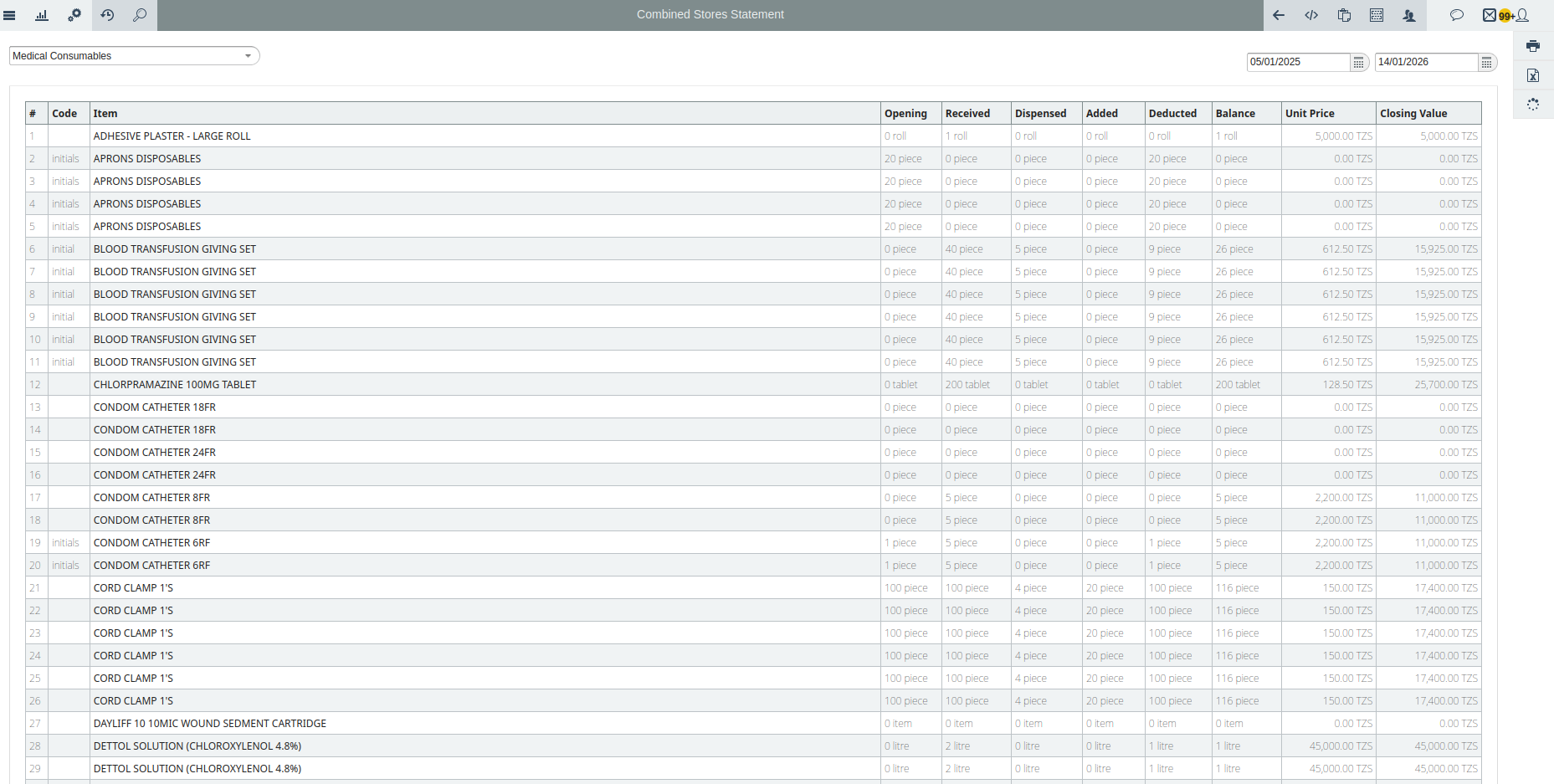
1. Combined Stores Statement Report
Provides a summary of inventory movements across stores for a selected period. It shows each item’s opening stock, received quantity, dispensed quantity, any additions or deductions, the remaining balance, unit price, and closing value. Users can filter by date and category.
Item
The name of the inventory item.
Opening
The quantity of the item available at the beginning of the period.
Received
The quantity of the item received during the period.
Dispensed
The quantity of the item issued or used during the period.
Added
Any quantity added to stock other than regular receipts (e.g., adjustments).
Deducted
Any quantity removed from stock other than normal dispensing (e.g., adjustments).
Balance
The remaining quantity of the item after all additions and deductions.
Unit Price
The cost per unit of the item.
Closing Value
The total value of the item at the end of the period (Balance × Unit Price).
Calendar
The date or period for which the statement is generated.
Category
The category of the item.
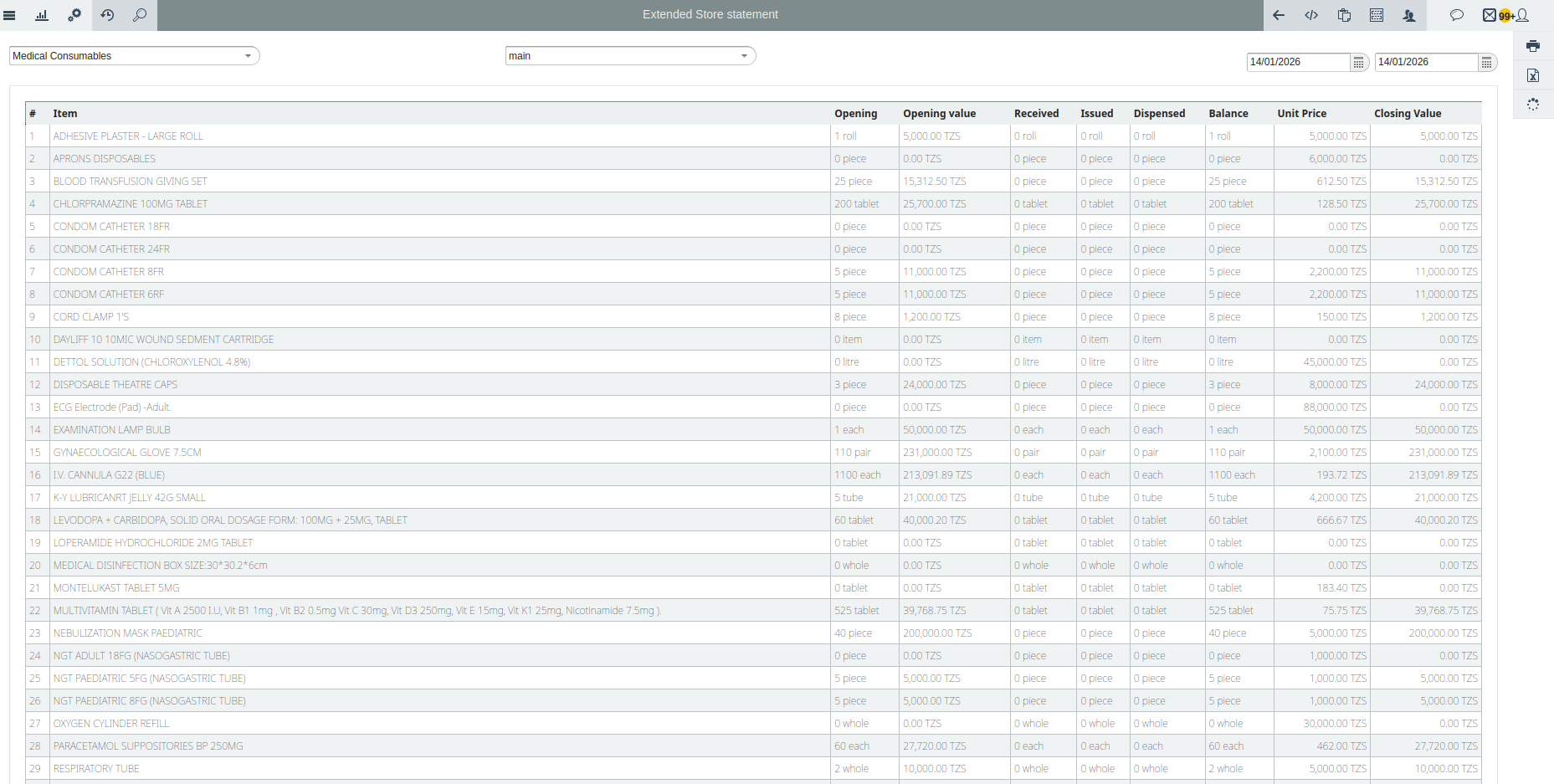
2. Extended Store Statement Report
Gives a detailed summary of stock movements for a specific store. It shows each item’s opening quantity and value, received, issued, and dispensed quantities, the remaining balance, unit price, and closing value. To view the Extended Store Statement report, first select the date for which you want to see the report. Then choose the store and category. Inaya will display the Extended Store Statement report based on the user’s selections.
Item
The name of the inventory item.
Opening
The quantity of the item available at the start of the period.
Opening Value
The total value of the opening stock (Opening × Unit Price).
Received
The quantity of the item received during the period.
Issued
The quantity of the item issued during the period.
Dispensed
The quantity of the item dispensed or used.
Balance
The remaining quantity of the item after all movements.
Unit Price
The cost per unit of the item.
Closing Value
The total value of the remaining stock (Balance × Unit Price).
3. Item Statement Report
Shows all inventory movements for a specific item over a selected period.
Date
The date when the action occurred.
Action
The type of activity performed on the item (e.g., received, issued, dispensed, adjusted).
Done By
The user who performed the action.
Quantity
The number of units involved in the action.
Unit
The unit of measurement for the quantity (e.g., pieces, kg, liters).
New Balance
The updated quantity of the item in stock after the action.
New Balance Unit
The unit of measurement for the new balance.
Store
The store where the action took place.
Reference
Any reference number or document associated with the action.

4. Item Statement Summary Report
Provides an overview of stock movements for a specific item within a selected period. To view this user firsts choose an item and date to specify the period
Store
The store where the item is managed.
Opening Balance
The quantity of the item available at the beginning of the period.
Received
The total quantity of the item received during the period.
Issued Out
The quantity of the item issued to another store or location.
Adjusted Added
The quantity added through stock adjustments.
Adjusted Deducted
The quantity removed through stock adjustments.
Dispensed
The quantity of the item dispensed or used.
New Balance
The remaining quantity of the item after all movements.
Unit
The unit of measurement for the item (e.g., pieces, boxes, liters).

5. The Store Statement Report
Shows a summary of all inventory movements and balances for a specific store over a selected period. Once the user chooses the item category and store then will be able to see the required report.
Item
The name of the inventory item.
Opening
The quantity of the item available at the start of the period.
Received
The quantity of the item received during the period.
Issued
The quantity of the item issued to other stores or locations.
Dispensed
The quantity of the item dispensed or used.
Added
The quantity added through stock adjustments.
Deducted
The quantity removed through stock adjustments.
Balance
The remaining quantity of the item after all movements.
