How to Process Approval for a Purchase Order
1. Overview
When a Purchase Order is submitted, Inaya checks whether an approval process has been configured and whether the Purchase Order requires approval.
If approval is required, the Purchase Order status changes to Pending for Approval and the Purchase Order is routed to the first person responsible for approving it in the approval request under Purchase.
If approval is not required, the Purchase Order proceeds directly to the next stage of the procurement workflow, such as Pending Delivery.
The Purchase Order itself is the transaction being approved. The approval process does not create a separate Purchase Order approval transaction.
2. Why Do Purchase Orders Require Approval?
A Purchase Order represents a financial commitment by the organization.
When a Purchase Order is issued, the organization may become liable to pay for the goods or services specified in the Purchase Order. For this reason, it is important that an authorized person reviews and approves the Purchase Order before it proceeds.
The approval process helps the organization:
Ensure that purchases are authorized.
Confirm that the requested goods or services are appropriate.
Ensure that the Purchase Order follows the organization's approval process.
Track which Purchase Orders have been approved.
Identify Purchase Orders that are still waiting for approval.
Prevent unauthorized purchases from proceeding.
Maintain accountability for purchasing decisions.
A user creates a Purchase Order for goods worth 250,000.00 TZS.
If the configured approval criteria require approval, the Purchase Order does not proceed directly to delivery.
Instead:
The assigned approver must review and approve the Purchase Order before it can proceed.
3. Approval Criteria
Whether a Purchase Order requires approval depends on the approval criteria configured in the system.
For example:
Approval Strategy | Minimum Amount | Inclusive | Maximum Amount | Inclusive | Association |
|---|---|---|---|---|---|
PURCHASE ORDER APPROVAL | 0.00 TZS | Yes | 200,000,000.00 TZS | Yes | Purchase Order |
If a Purchase Order falls within the configured approval criteria, the system requires approval when the Purchase Order is submitted.
Example
If the configured approval criteria apply to a Purchase Order, the workflow may be:
PO-AA-AA-15-95 → Submitted → Approval Criteria Checked → No Approval Required → Pending for Approval
If the Purchase Order does not require approval:
PO-AA-AA-15-95 → Submitted → No Approval Required → No Approval Required → Waiting Delivery
4. What Happens When a Purchase Order Is Submitted?
After the Purchase Order has been created via purchase > Purchase order and saved, the user submits for approval.
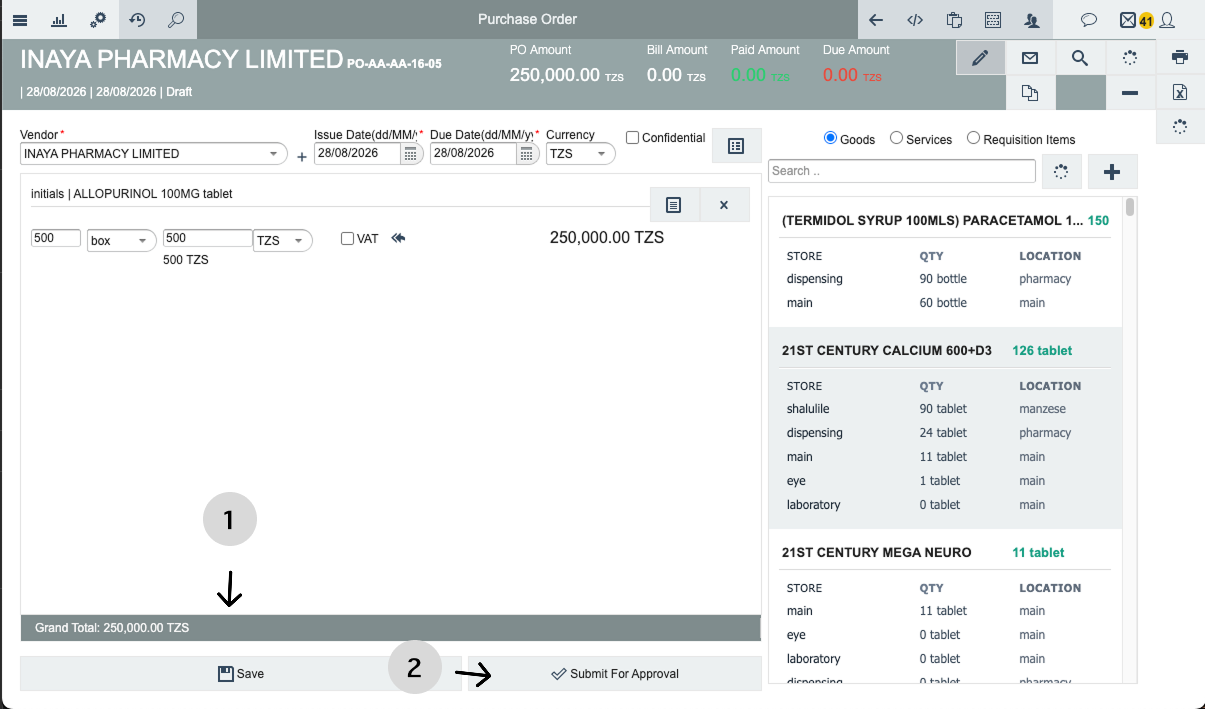
Inaya then checks whether the Purchase Order requires approval.
Scenario 1: Approval is required
The Purchase Order changes to:
Waiting Approval
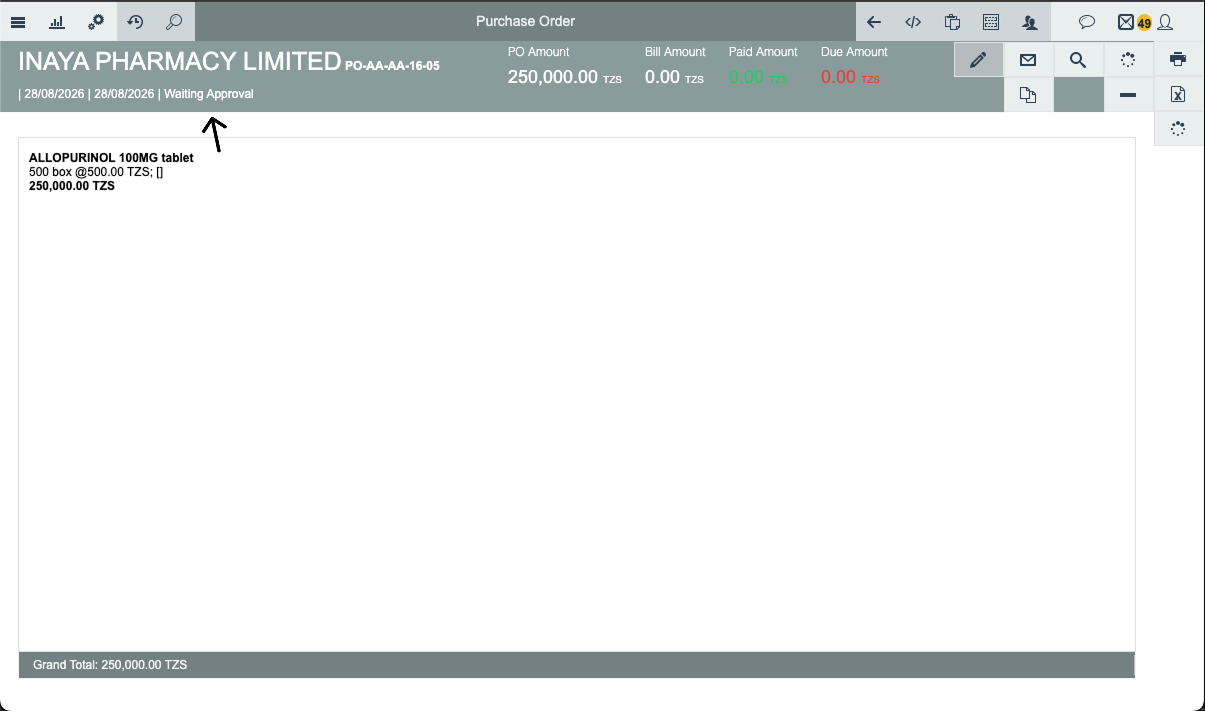
The system then routes the Purchase Order to the first configured approver in the approval request.
Scenario 2: Approval is not required
The Purchase Order proceeds directly to the next procurement stage.
Purchase Order → Submitted → No Approval Required → Waiting Delivery

This means that not every Purchase Order will go through an approval process.
5. How to Process Approval for a Purchase Order
Once a Purchase Order requiring approval has been submitted, the assigned approver can process it.
Step 1: Navigate to Approval Requests
Navigate to:
Logistic → Approval Requests
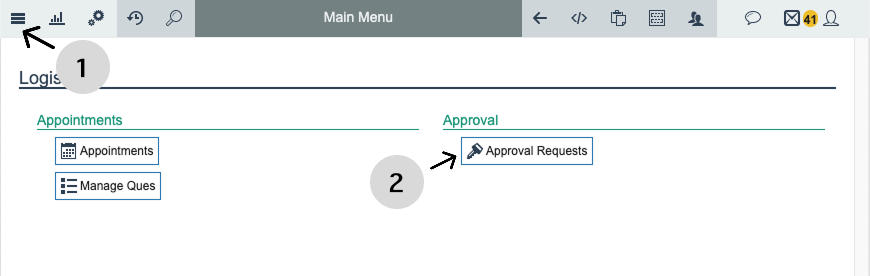
The approval area displays Purchase Orders that require action according to the user's permissions and the configured approval workflow.
Step 2: Open Pending Approvals
Open the Pending section to view Purchase Orders that are currently waiting for approval.
The pending list allows the approver to identify Purchase Orders that require action.
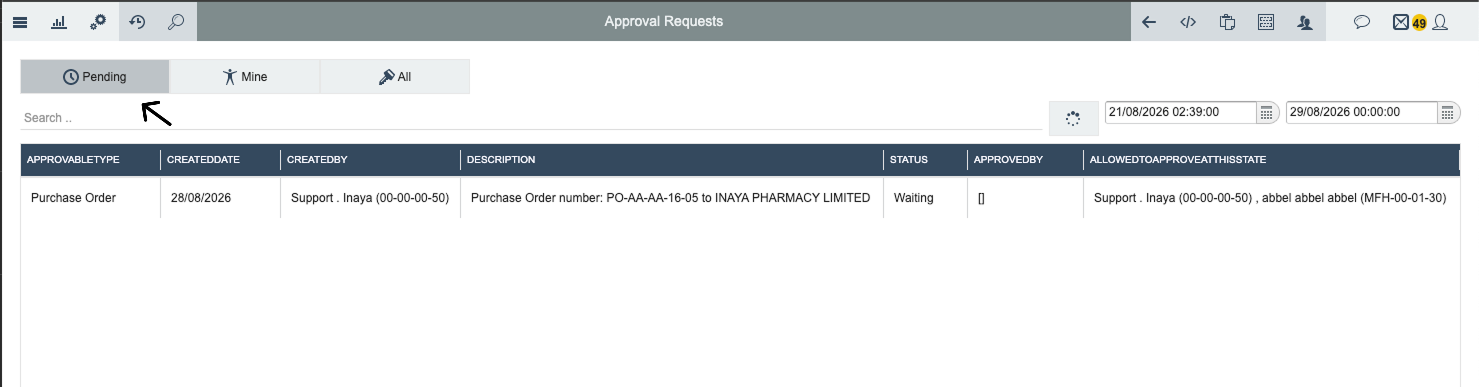
Step 3: Locate the Purchase Order
Find the Purchase Order that requires approval for instance this PO-AA-AA-16-05 and Select the Purchase Order to open and review its details.
Step 4: Open the Purchase Order and Review the Purchase Order
Open the Purchase Order to view its details. and The approver should review the actual Purchase Order before making a decision.
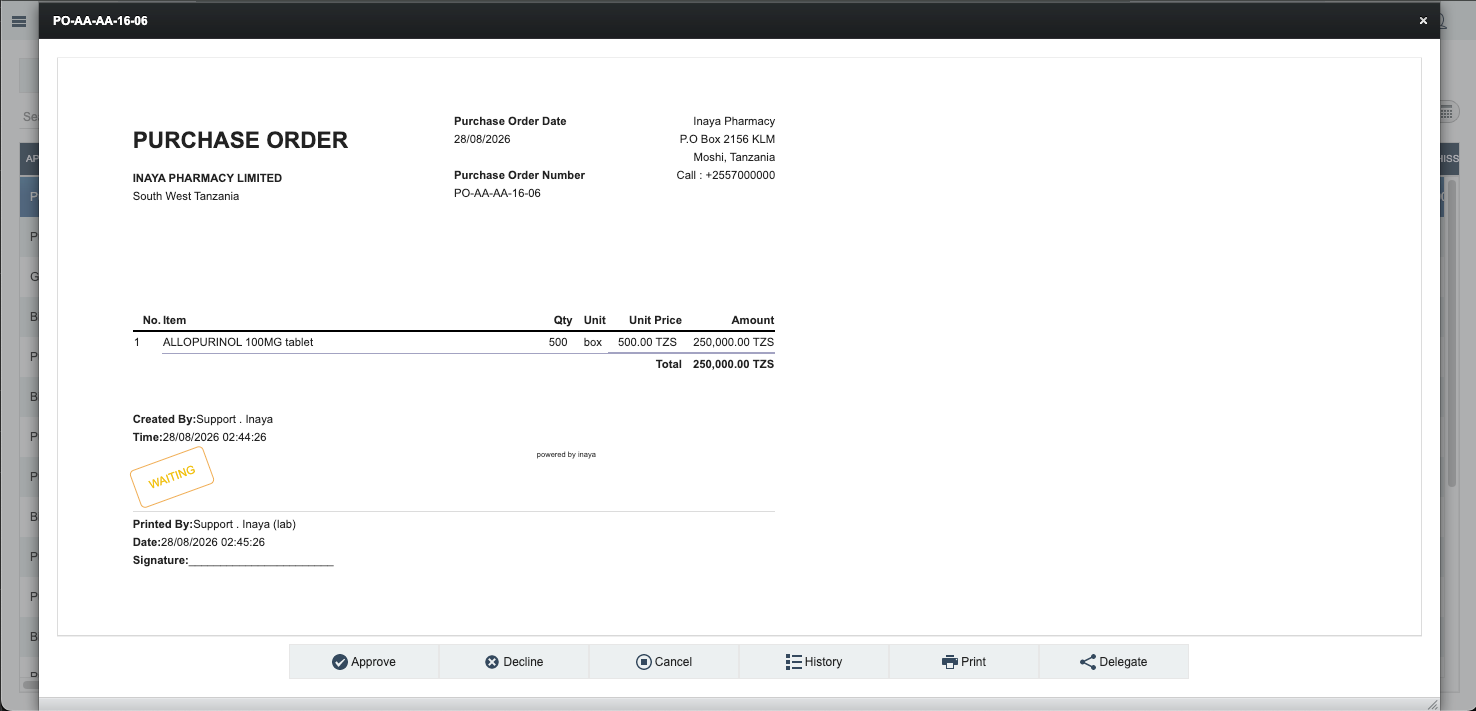
Before approving the Purchase Order, the approver should verify the relevant information recorded on the PO.
The review may include:
Vendor
Purchase Order number
Items
Quantities
Unit prices
Total amount
Store or delivery information
Purchase requirements
Other relevant procurement information
The approver should confirm that the Purchase Order is accurate and acceptable before approving it.
7. Approve or Reject the Purchase Order
After reviewing the Purchase Order, the authorized approver can make a decision.
There are two main outcomes:
Approve
Reject (Decline)
Cancel
8. Approve the Purchase Order
If the Purchase Order has been reviewed and is acceptable, the authorized approver can approve it by clicking button below 1 and then add comment 2 followed by proceed 3.
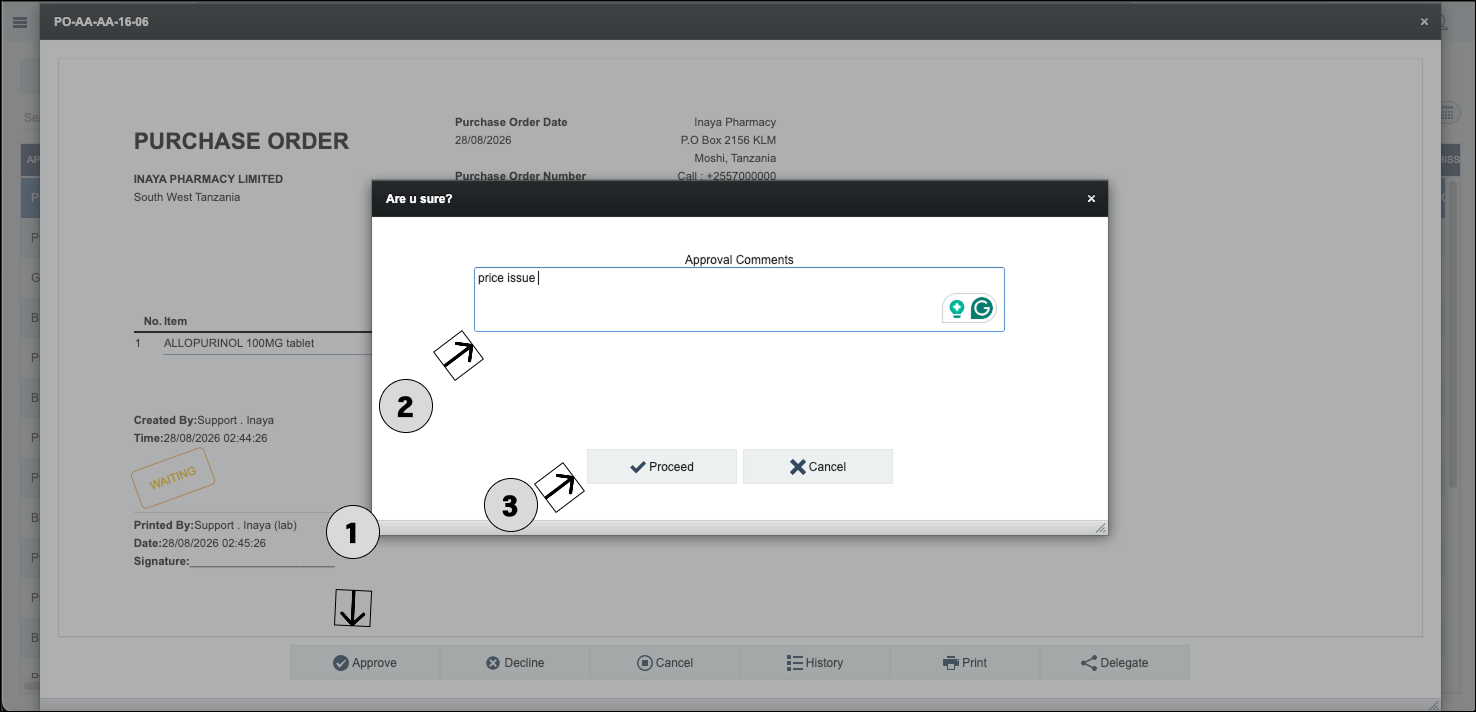
The approval is recorded by the system. meanwhile in the purchase order it will change state from waiting for approval to waiting for delivery
9. Reject the Purchase Order
If the Purchase Order is not acceptable, the authorized approver can reject it.
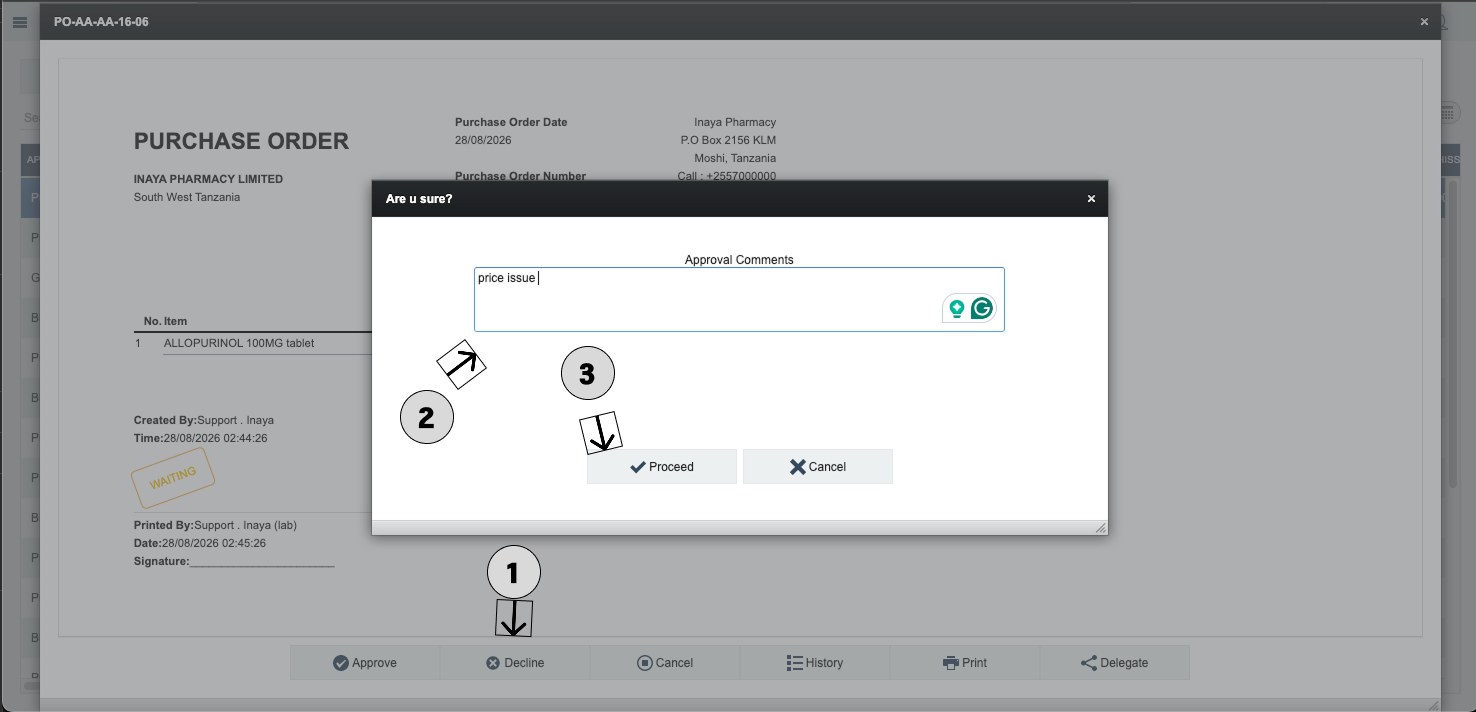
A Purchase Order may be rejected because, for example:
The requested items are incorrect.
The quantity is incorrect.
The price is not acceptable.
The vendor is incorrect.
The purchase is not authorized.
The Purchase Order does not meet the organization's requirements.

When rejected, the Purchase Order follows the rejection workflow configured in the system.

10. Processing Multiple Approval Levels
A Purchase Order may require approval from more than one person or either of the two approver.
For example:
Approval Level | Approver | Responsibility |
|---|---|---|
Level 1 | Store Manager | Reviews the operational need and requested items. |
Level 2 | Manager | Reviews and validates the purchase. |
The exact approval levels depend on the configured approval strategy. Each approver processes the Purchase Order when it reaches their configured approval level.
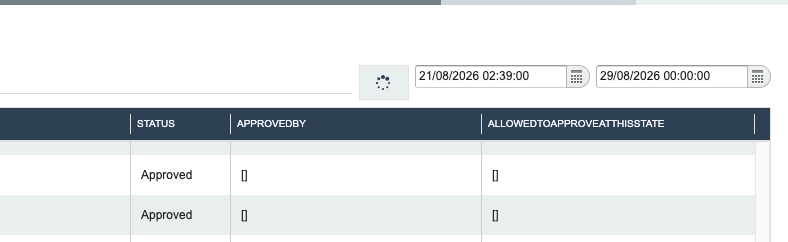
11. Approval: ALL
When an approval strategy is configured as Approval: ALL purchase order move free with no approval
12. What Happens After Approval?
Once all required approvals have been completed, the Purchase Order proceeds to the next stage of the procurement workflow. The exact next status depends on the configured Purchase Order workflow.
After approval, the Purchase Order can continue through the normal procurement process, including delivery and receiving.
